Published on
Written by
Dekodi Team
You paid for a site that finally looks like your business. Then the calls slow down. That's not a mystery, and it's not your fault for wanting a better site. Most redesigns are sold as a look. Search treats them as a move.
Table of Contents
What a Redesign Really Changes for Search
You launch on Monday. The new site looks sharp, the team is happy, and everyone shares the link. By Friday the phone is quieter, and an old Google result leads to a page that doesn't load. Nobody set out to break anything. The project was scoped as design, so nobody mapped the search side.

A redesign changes URLs, navigation, internal links, page copy, and sometimes hosting. Search engines notice each one, because those changes alter how they crawl and index your pages. Moving shop offers a useful comparison. Every old address needs a clear new home, or customers and Google both hit dead ends. The same logic applies whether you're rebuilding a service site or working through search visibility for a plumbing business.
Google says replacing old URLs in results can take a few weeks or more for medium-sized sites, and longer for larger ones, according to Google's account of its own Search Central migration. That site saw a 159% increase in clicks and a 23% increase in impressions three months after migration. That doesn't guarantee your result. It does prove the work can pay off when it's planned.
So say this to any designer, in plain words. Treat this redesign as a migration with a scoreboard, not a paint job. The scoreboard is calls, leads, and visibility. If those aren't tracked before launch, you won't know what the new site did. You'll only know it looks better.
Build a URL Inventory and Baseline This Week
Start with a list of every page that matters, before anyone opens a design file. Traffic is the wrong filter on its own. Say a dental practice has an emergency page. It gets few visits, but it brings a steady stream of calls from people in pain. Delete it because the traffic looks small and you've cut a real source of work.
One Row Per URL
Build a simple spreadsheet. One row for each URL, which is just the web address of a page. Crawl the current site with a crawling tool to export every URL with its title, description, canonical tag, and status code. A canonical tag tells Google which version of a page is the main one. Then pull your organic landing pages and backlinks from Search Console. Backlinks are links from other sites to yours. Check indexation status too, which means whether Google keeps the page in its results.
Inventory field | Why it matters | Where to get it |
|---|---|---|
Every indexed URL | The addresses you must map or consciously retire | Site crawl export and XML sitemap |
Organic landing pages | Pages that already earn search visits | Search Console performance report |
Backlinks to each URL | Links from other sites that break if the address changes | Search Console links report |
Titles and meta descriptions | The words people see in search results | Site crawl export |
Indexation status | Whether Google currently keeps the page in results | Search Console page indexing report |
Calls, forms and bookings | Pages that produce customers even with little traffic | Call tracking, form logs and booking tool |
Local and service area pages | Pages that tell Google where you serve | Site crawl plus your service area list |
Add call tracking, form, and booking data to the same sheet. Now each row shows what a page earns, not just how many people saw it. That's how an SEO website redesign protects revenue instead of guessing.
The Edge Cases Owners Miss
A few page types hide from a quick review. Watch for these:
Old blog posts with links: A post from years ago may still carry links from other sites.
PDFs and files: Price sheets and guides can show up in search on their own.
Pages behind logins: Client or member pages still need a plan, even if Google can't see them.
Location pages only in the sitemap: If a page exists in your sitemap but not in your menu, it can still rank.
Google's guidance treats this as a controlled migration, and Google's site move support page recommends keeping domain-migration redirects for at least 180 days, or longer while they still receive traffic. The same guidance warns against judging the move on rankings alone. Use impressions, clicks, indexed pages, sessions, qualified leads, and revenue.
Your Step This Week
Do this before any design work is approved. Export 90 days of Search Console performance data and note your top 20 pages by clicks. List the pages tied to calls or bookings, even if they aren't in that top 20. Save your Core Web Vitals report and flag the slowest group of pages. Then write down your current review count and rating.
Practical rule: If a page brings calls, links, or bookings, it gets protected first. Traffic alone doesn't decide.
Now mark each row in your sheet. Use four labels only: keep, merge, move, or retire. Keep means the page stays at the same address. Merge means two pages become one. Move means the address changes. Retire means the page goes away and its visitors need a new home. That marked-up sheet is your baseline, and it's the document the whole redesign gets judged against.
How to Map Every Old URL to a New Page
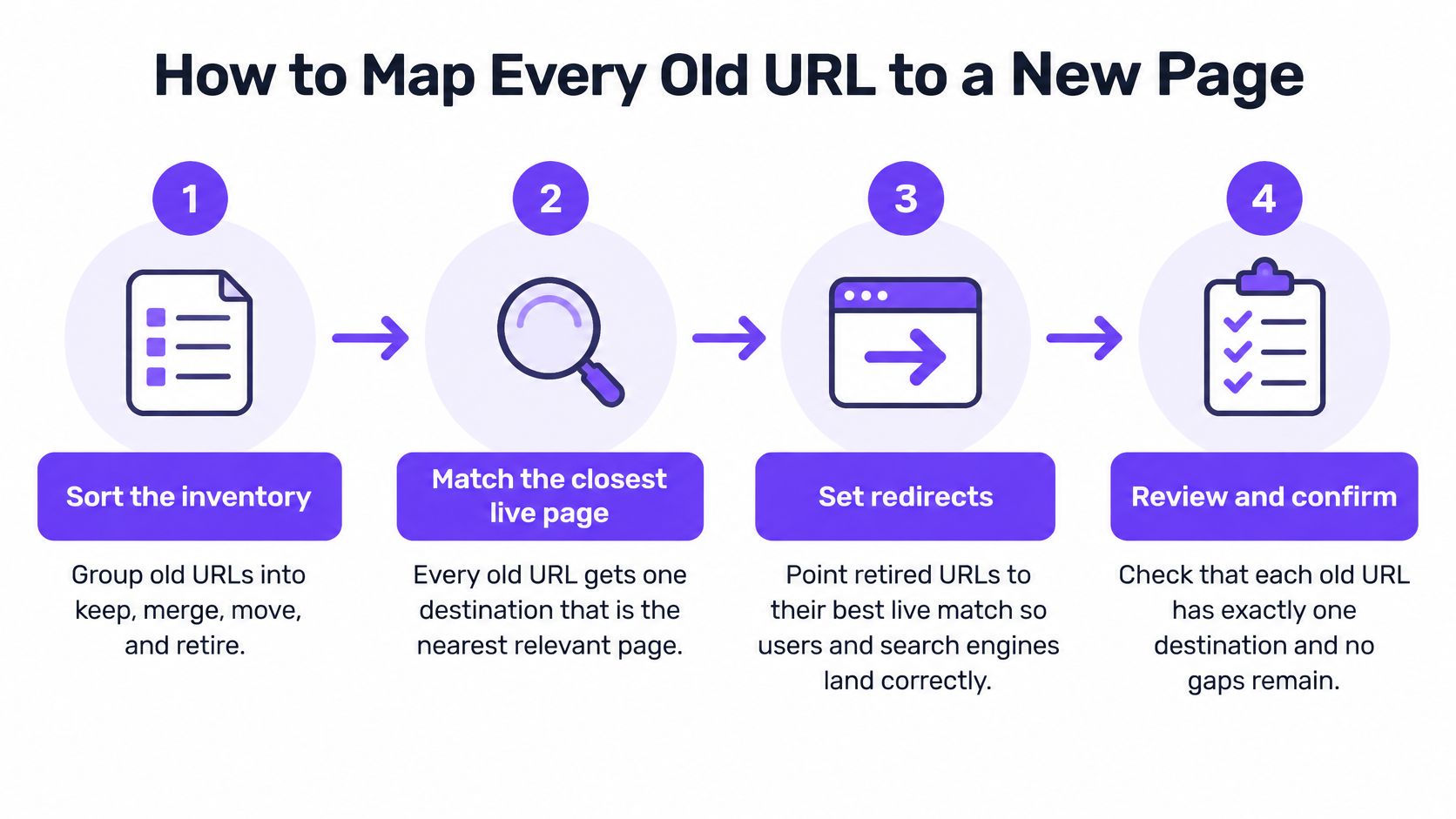
The rule is simple. Every old URL gets one destination, and that destination is the closest live match. Not the homepage by default. Not a page that sort of fits. The nearest page on the same topic, so a visitor who clicked an old result lands somewhere that answers the same need.
The four stages below show the mapping flow from sorting to final check.
The Six Steps
Sort the inventory into keep, merge, move, and retire, starting with pages that bring calls and links, because those carry the most risk.
Map each old URL to its closest new match by topic, because a relevant landing page keeps both the visitor and the search value.
Set permanent redirects, using a 301 or 308, so browsers and search engines go straight to the new page.
Point each redirect at the final URL and keep chains short, since every extra hop adds delay and can fail.
Update internal links, the sitemap, and canonical tags so they name only final URLs, because mixed signals slow Google down.
Keep redirects in place while old URLs still earn visits or links, which is often a long stretch.
Google's site move guide recommends retaining redirects for at least one year and warns that ranking movement is normal while pages are recrawled. If you're also changing domains, it pays to plan your domain move with RedirHub before you touch the live site, since a domain change adds a second move on top of the redesign.
The short video below walks through redirect choices in plain terms, so you can follow the logic your developer should be using.
Where Each Page Type Goes
Old page situation | Redirect to | Watch for |
|---|---|---|
Page moved to a new address with the same topic | Its closest new equivalent | Old and new versions both live at the same time |
Two old pages merged into one | The merged page | Choosing the new target by design preference instead of the stronger linked page |
Service renamed | New service page with matching terms | New copy that drops the old service name customers still search for |
Page removed with no replacement | Closest relevant live page | A mass redirect to the homepage can read as a soft 404 |
Location page retired | Nearest live location or regional page | Old local links and reviews pointing at a closed page |
Old PDF or file with links | New page holding the same information | Files that rank with no matching page to send visitors to |
A soft 404 means the page looks like a dead end to Google even though it loads. Sending every removed page to the homepage is the fastest way to create that problem.
Some pages shouldn't be touched at all in the first pass. If a page converts well and carries strong links, keep its address and its core copy. You can restyle around it. Prioritize your redirect work by backlinks and conversions first, then traffic. A low-traffic page can still hold long-tail visibility and assist bookings you'd never see in a visits report.
Set Speed and Local Targets Before Design Approval
Here's the quiet trap. Your homepage scores well in a demo, while your service and location templates lag behind. Template means the reusable layout behind a group of pages. Customers rarely convert on the homepage alone. They call from a service page, a location page, or a contact page. If those are slow, the pretty homepage didn't help.
Three Measures Worth Approving
Metric | What it measures | Common redesign cause |
|---|---|---|
Largest Contentful Paint (LCP) | How long until the main content appears | Oversized hero images and slow servers |
Interaction to Next Paint (INP) | How quickly the page responds after a tap or click | Heavy scripts, slow menus and form handlers |
Cumulative Layout Shift (CLS) | How much elements jump around while loading | Images without set sizes and late-loading banners |
Google's Core Web Vitals documentation sets the good targets at LCP of 2.5 seconds or less, INP of 200 milliseconds or less, and CLS of 0.1 or less. It labels LCP above 4 seconds, INP above 500 milliseconds, or CLS above 0.25 as poor. These use real visitor data at the 75th percentile, so at least three quarters of visits must pass.
Set one target per template: home, service, location, blog, and contact. Pull the field data from your Core Web Vitals report, find the slowest group, and fix the middle band before launch if it carries pages that produce calls. To reduce layout shifts with CLS optimization, set image sizes in advance so buttons don't jump while a customer tries to tap. Lab scores from a single test can mislead you, because they miss slow phones and real tap delays.
Local Details Are Part of the Same Approval
Speed isn't the only check. Your business name, address, phone, and hours must match across the site and your verified Google Business Profile. Each service and location page should say plainly where you work, in the words customers type. That's the same thinking behind doing local keyword research by service area. Link the site to your profile so the two support each other.
One honest limit. Prominence in local results also rests on links from other sites and your review count. A redesign alone won't fix that. Approve no design until each template has a written target you can test against later.
How to Launch and Watch the First 90 Days
Treat launch as a staged event, not a single switch you flip on Friday afternoon. Most redesign damage isn't the design itself. It's a small setting nobody checked, left running for weeks. A short pre-launch pass catches those while they're still cheap to fix.
The timeline below shows the launch phases, from pre-launch checks through the first 90 days of monitoring.

Before You Go Live
Run automated checks on the new site while it's still private. You're looking for specific failures:
4xx and 5xx errors: Pages that won't load or server faults that block visitors.
Orphan pages: Pages with no internal links pointing to them, so Google struggles to find them.
Accidental noindex tags: A setting that tells Google to keep a page out of results, often left on from the test site.
Canonical conflicts and sitemap mismatches: Pages naming a different main version than the sitemap lists.
Then submit the new sitemap in Search Console on launch day. Confirm that important pages are reachable through normal links on the site, not only through the sitemap.
Launch Week and Days 1 to 30
Check crawl errors daily during launch week. Click a sample of old URLs yourself and confirm each lands on the right new page in one hop. Confirm new URLs load cleanly too. This takes an hour and catches the failures that cost the most.
Expect ranking movement while Google recrawls. That's normal, and it can run for weeks. But don't wave away a sudden drop in calls. Calls are a business signal, not a ranking theory. If the phone goes quiet, check the forms, the click-to-call buttons, and your top landing pages that same day.
Days 30 to 90
From day 30 to 60, check Core Web Vitals by URL group against the targets you set. Google's Core Web Vitals guidance for Search sets the good thresholds at LCP within 2.5 seconds, INP below 200 milliseconds, and CLS below 0.1. The same guidance warns that a high lab score doesn't prove a page is ready, since lab tests miss slow mobile networks and template-specific problems. Fix slow templates before you roll the design wider.
From day 60 to 90, compare each metric with the matched pre-launch period. Same length of time, same days of the week where you can. Then decide what you're looking at.
A dip with clean redirects and rising new-URL traffic is usually reindexing. A page returning 404 with no redirect is an error, and errors don't heal on their own.
Other error signs are plain. Old-URL traffic falls to zero while the new URLs don't rise. One template is slow on mobile while the rest pass. Indexed page counts drop and stay down. Name who checks what each week, in writing. One person watches Search Console, one watches calls and forms, and you review both together. If nobody owns it, nobody sees it.
Measure Calls and Trust, Not Just Rankings
Owners check rankings and visits because those numbers are easy to find. Customers act differently. They call, ask for directions, book, and read reviews. A scoreboard that only shows visits will make a healthy redesign look like a failure and a weak one look like a win.
Part of the problem is the Patchwork Tax. Tools get bought one at a time, paid features sit unopened, and hours disappear switching between apps. Marketing teams commonly use only a fraction of what their tools can do. More dashboards don't fix that. Fewer, connected measures do.

Metric | Where to find it | What it tells you |
|---|---|---|
Branded searches | Search Console, filtered to your business name | Whether people look for you by name |
Calls and direction requests | Call tracking and Business Profile insights | Demand from Maps and local results |
Qualified form submissions and bookings | Website analytics goal events | Whether visitors take the next step |
Business Profile views and actions | Business Profile insights | Discovery and action from Google listings |
Review count and average rating | Your review platforms | Trust signals customers check before calling |
Organic clicks to service and location pages | Search Console, by page | Whether money pages still earn visits |
Mentions in AI answers | Monthly spot checks of key questions | Whether AI tools describe your business correctly |
That last row matters more each year. A Pew Research Center analysis covered by Business Today looked at 68,879 Google searches from 900 U.S. adults in March 2025 and found users clicked a traditional result 8% of the time when an AI Overview appeared, versus 15% without one. Google disputed the broader reading, so treat it as a signal, not a verdict. A redesign can lose informational clicks and gain better visitors at the same time. Judge it by trusted actions, and keep an eye on your standing with a regular web reputation check across reviews and listings.
Review these seven measures monthly, with one named owner per measure. Rank your pre-launch inventory the same way: the pages that bring calls, earn links, and produce leads get watched first, whatever their traffic says. Drop any metric that drives no decision. More options get attention. Clear options get decisions. At Dekodi, the inventory, redirect map, speed targets, launch checks, and monitoring run as one connected plan tied to one scoreboard, so the redesign gets judged by leads rather than by a traffic chart.
If you're planning a redesign and want the search side mapped before design starts, contact Dekodi through its website to review your current pages, calls, and rankings. You'll get a clear read on what must stay, move, or retire before a single page goes live.