Published on
Written by
Dekodi Team
You type your business name into Google on a quiet Tuesday. An old, painful review sits above your website, and Maps still shows last year's Sunday hours. You're doing the work, but customers are seeing a version of your business you barely recognize.
That's frustrating, especially when some of it is true, some is outdated, and some is wrong. Online reputation repair starts by separating those problems, not by buying more software or posting cheerful updates over the top of them. The goal is being trusted, with accurate facts and real answers wherever customers check you out.
Table of Contents
What Your Name Search Shows Today
Start with what a customer can see for themselves. Your website might look fine while a directory sends people to an old address, or an AI answer says you don't offer a service you sell every day.
Give yourself a 20-minute first pass. This isn't a complete investigation. It's enough to spot the most visible problems without spending your afternoon chasing every mention.
Use the same screen a customer would use, rather than relying only on your business dashboard.

Search your name and city. Save the results, including Maps, directory pages, and any prominent criticism.
Search your service and city. Use the words a new customer would type, not your internal service names.
Open your Google Business Profile. Read the reviews and inspect the photos, posts, contact details, and hours.
Check the review platforms customers use. Concentrate on the places relevant to your business, rather than opening accounts everywhere.
Check AI answers. Ask ChatGPT who you are, what you do, and where you're located. Check Google's AI overview when one appears, and save the answers.
Make a notebook with columns for where you saw it, what it says, whether it's true, and how old it is. If you can't verify something, mark it unknown rather than guessing.
Our web reputation check guide can help you make that first pass more systematic.
This list is a map, not a verdict on your business.
A mix of useful, stale, and incorrect information doesn't mean you've failed. Keep the notebook open. The important decision is what each finding needs, not how unpleasant it feels.
Sort Every Problem Before You Touch It
Put each finding into a problem group before choosing a fix. A genuine complaint needs a different response from an incorrect address, even if both make you wince.
Some findings belong in more than one group. A real customer might describe an unresolved problem while also posting private details. Record both issues so you can address the service failure and the content violation separately.
Problem groups and the first move for each
Problem group | What it looks like | First move | Who handles it |
|---|---|---|---|
Accurate but unfavorable | A real customer describes a real bad visit | Fix the cause, then reply with a specific resolution | You, with the team involved |
Inaccurate fact | Wrong hours, address, services or owner on a profile, page or directory | Correct it at the source, then in every directory | You |
Policy-violating content | Abusive, off-topic or private details in a review or post | Document it and report it through the platform's process | You, using platform reporting |
Unresolved complaint | A customer raised an issue that is still open | Contact the customer privately and close the loop | You or your manager |
Fake or manipulated review | Posts from people who never used the service, or a burst of identical praise | Document the evidence and report it, without arguing in public | You, using platform reporting |
Prioritize what customers encounter
Start with prominent name-search results and review-platform content. Then work through lower-visibility mentions. A wrong phone number beside your name deserves attention before an obscure directory description.
The Pew Research Center's report on online reviews documents how people use reviews before purchases and the difficulty readers have judging their accuracy. That's why visibility and credibility belong in your priority decisions, not just how angry a post makes you.
For a business-focused way to think about those priorities, the revenue-focused reputation insights from The Advertising Suite offer a useful companion perspective. Keep your own decisions tied to the customer action at risk, such as calling, visiting, or booking.
Expand your notebook into a working log. Add the URL, search query, position, sentiment, evidence, owner, action, and outcome. Sentiment means whether the item reads as positive, neutral, or negative.
Review the log weekly during the first 90 days. Give every action a named person responsible, even if that person is you.
Practical rule: If the complaint is true, the fix starts in operations, not in the reply box.
How to Correct Wrong Facts Across the Web
Wrong information is a reputation problem even when nobody leaves a bad review. A customer who arrives at a locked door doesn't care whether the mistake began on your website or in a directory.
Map results and AI answers can draw on conflicting public information. You can correct the sources you control and submit corrections elsewhere, but you can't dictate what every system displays.
Use this sequence to keep the work organized.
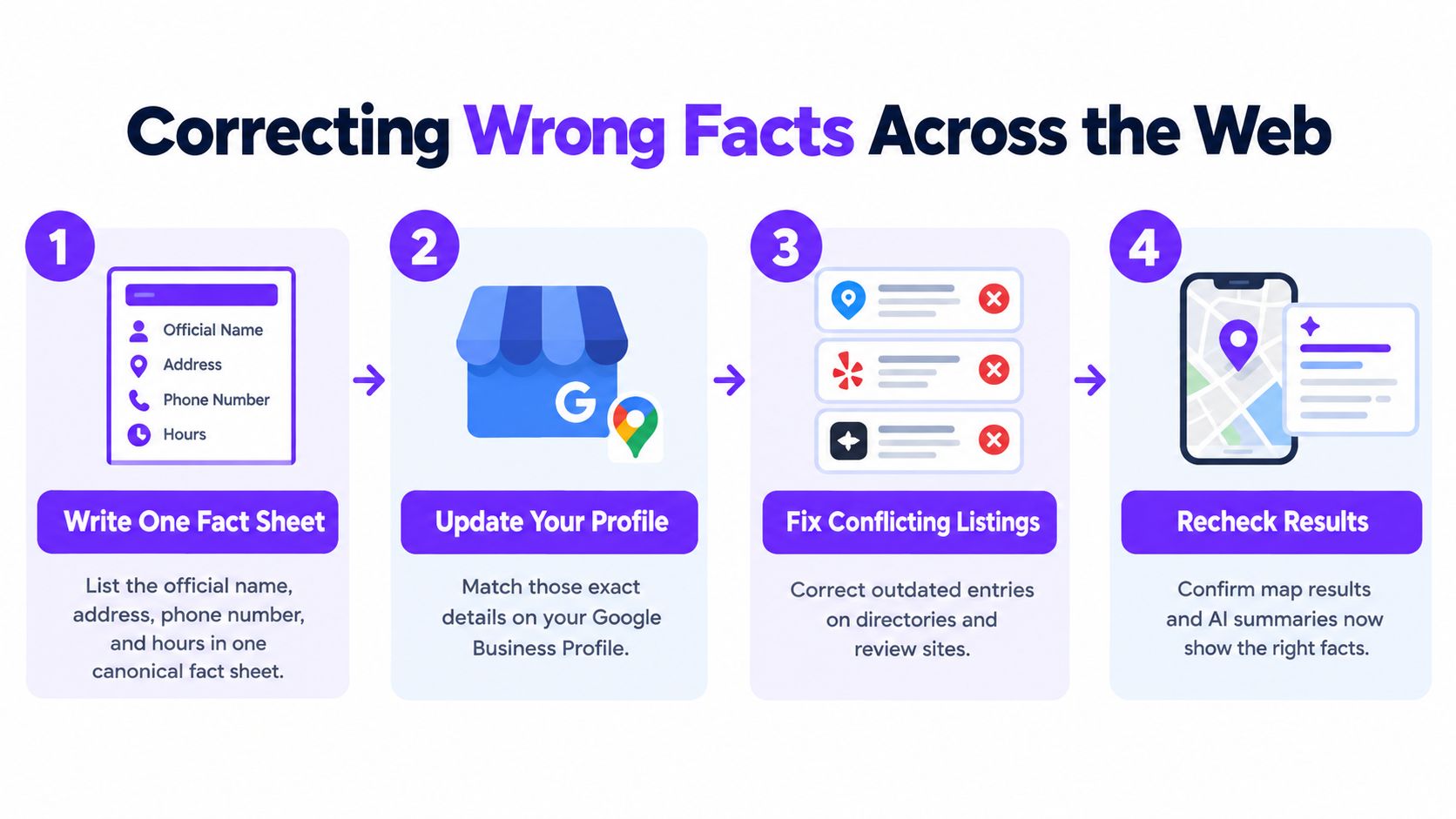
Establish the facts before editing
Write one official fact sheet. Include your business name, address, phone, hours, services, service areas, and owner name where publicly relevant. This is your canonical record, meaning the reference everyone uses.
Compare each listing against it. Record the exact mismatch, not just “listing wrong.” That makes correction requests easier to follow.
Fix your profile and website first. Check contact pages, location pages, and the footer. Don't send a directory editor to a website that contradicts your request.
Submit corrections with proof. Use the platform's claim or correction process. Attach appropriate evidence, such as current signage or a business license, without exposing unnecessary private information.
Address duplicate and closed-location listings. Request a merge, closure, or removal through the relevant platform. Don't mark an active location closed just because its listing is inconvenient.
Set a follow-up check for two weeks later. Treat that as your reminder, not a promised completion date. Corrections spread unevenly, and no timeline is guaranteed.
Repeat customer questions in AI tools. Save the answers and any cited pages. Correct the underlying source where possible, and record when an answer gives no traceable source.
Where wrong facts usually live
Where it lives | What to check | How to correct it |
|---|---|---|
Google Business Profile | Name, address, hours, categories and services | Edit the profile directly, then confirm the change is live |
Your website | Contact page, footer, service pages and hidden business data | Update every page and keep one source of truth |
Review platforms | Business details, categories and location | Use the platform's claim or correction form and attach proof |
Industry and local directories | Old addresses, phone numbers and closed locations | Submit corrections and request removal of duplicates |
Social profiles | Bio, hours and website link | Update the bio, link and any pinned post |
AI answer tools | What ChatGPT and Google's AI overview say about you | Ask the same questions monthly, note errors and trace the cited source |
Hidden business data means labels in your website's code that help search systems interpret your details. Ask whoever maintains your site to check those labels against your fact sheet.
For a visual companion, use this walkthrough alongside your correction log.
The easy-to-miss mistake is fixing the profile but leaving old hours in the website footer or a directory. Check the whole trail, then verify what customers really see.
How to Reply to Reviews Without Making It Worse
Assume a harsh review will stay unless you can identify a policy violation. A reply doesn't erase it, and Google's review-removal guidance distinguishes policy-breaking content from feedback a business simply dislikes.
Your public reply has a narrower job: acknowledge the issue, explain the next step, and show future customers how you handle problems. It isn't a courtroom closing argument.
That can be difficult when the criticism feels personal. Draft your answer away from the reply box before publishing it.

Use a short response structure
Acknowledge the feedback. Thank the reviewer or recognize the concern without sounding rehearsed.
Name the specific issue. Refer to the delayed order or missed appointment, not private account information.
Give a concrete next step. State what changed or what you'll investigate. Don't claim a fix you haven't made.
Move the conversation to a private channel. Offer your published business phone or email, never the customer's contact details.
Stop before it becomes an argument. You don't need to answer every accusation publicly.
Example reply for a bakery that has changed its collection process
Thanks for telling us about the delay collecting your order. We're sorry it wasn't ready at the agreed time. We've changed how we confirm collection times with the kitchen. Please call the number on our profile and ask for the manager so we can discuss a resolution.
For help organizing response ownership and tone, Carlos Alba Media's review management guide is a useful companion resource. Service businesses can also connect review work with the practical visibility checks in our plumbing search engine optimization guide.
If an unfair review also violates policy, preserve screenshots, dates, and the specific violation before reporting it through Google Business Profile. Keep any public response restrained while the report is reviewed.
A missing customer name in your records isn't proof of fraud. Someone may have booked under another name or visited without making a booking.
Write for the future customer reading the exchange, not for the satisfaction of winning it.
Where the Line Sits on Fake and Pressured Reviews
Buying praise, posting staff-written customer stories, or offering rewards for positive ratings may look like a quick repair. They create another credibility problem instead.
The U.S. Federal Trade Commission's Consumer Reviews and Testimonials Rule guidance addresses fake or false reviews, including purchasing them, certain insider-review practices, and reviews generated with AI. It also addresses incentives conditioned on positive or negative sentiment.
That doesn't mean employees can never describe their experience. It means you mustn't disguise an insider as an independent customer or conceal a relevant connection.
Make the request honest
Ask real customers consistently. Send the same neutral request after each completed job or visit, rather than selecting only people who praised you.
Provide a direct review link. Don't require a positive private survey answer before revealing it.
Leave the rating to them. Don't suggest a score, write their review, or tie a reward to praise.
Keep staff involvement transparent. Never ask employees to pose as customers.
Use AI for administration, not impersonation. It can help draft a neutral request, but it shouldn't manufacture customer experiences.
Asking only happy customers is review gating. Even where a particular practice isn't covered by the same legal provision, it can conflict with platform rules and distort the feedback customers see.
An artificially perfect profile can make a careful reader suspicious. Steady, honest feedback gives people something more useful than a sudden burst of generic enthusiasm.
If you suspect an attack, save evidence and use reporting channels. Don't recruit friends to counter it with invented praise.
If you wouldn't comfortably explain the review request to a customer, rethink the request.
The same test applies when someone offers to “handle everything” without explaining where the reviews come from.
Measure Progress Without Chasing Star Averages
Your average rating can stay steady while the same complaint keeps arriving. That's not a repaired reputation. It's an unresolved service problem hidden inside an average.
Build a scoreboard that separates visibility, response quality, and confirmed fixes. A spreadsheet, your review platforms, Google Business Profile performance, and Search Console are enough to begin. Search Console shows how people find your website through Google.
Repair scoreboard: what to track and how
Measure | What it tells you | How to check it |
|---|---|---|
Negative results on page one | Whether unfavorable results still sit in the top results for your name | Search your name monthly and count them |
Share of results you control | Whether your profiles and pages fill more of page one | Count owned results against the total on page one |
Review response time | How quickly you answer new reviews | Average the time from posting to your reply in the platform |
Rating distribution | Whether recent ratings are shifting, not just the average | Compare the last 90 days against older reviews |
Complaint recurrence | Whether the same problem keeps coming back | Tag each complaint by theme in your log |
Branded search and calls | Whether people who search your name reach you | Check calls, direction requests and form fills from your profile |
Verified resolution rate | Share of logged complaints closed with a confirmed fix | Divide confirmed fixes by total logged complaints |
Read the measures together
Keep the weekly review during your initial repair period, then move to monthly reviews once the work is stable. Compare recent feedback with older reviews separately, so past problems don't obscure whether today's experience has changed.
For example, if waiting-time complaints stop but billing complaints continue, keep working on billing. Don't declare success because the overall rating looks healthier.
Be careful with attribution, meaning which activity produced an inquiry. A direction request isn't a confirmed visit, and a profile call isn't automatically a new customer. Record confirmed bookings separately when you can.
Also distinguish an action completed from an outcome verified. Submitting a directory correction isn't the same as seeing it published, and sending an apology isn't confirmation that a complaint is resolved.
Judge online reputation repair by whether people find accurate facts and receive real answers, not by a single attractive number.
Your First Move This Week
You don't need a new subscription to begin. You need a manageable list and enough time to finish a visible fix.
Run the name-search check. Save what appears before making changes.
Fill the first ten rows of your log. Assign each finding a problem group and a responsible person.
Correct one wrong fact today. Start at its source, such as your Google Business Profile hours.
Draft one unanswered review reply. Use the response structure and have someone check the tone.
Ask your next five customers for honest feedback. Send the same direct review request without a rating condition.
Use our guide to managing your online reputation if you need help turning that list into an ongoing routine.
The Patchwork Tax is the cost of disconnected choices: subscriptions you barely use, app switching, unclear results, and inquiries nobody owns. Gartner reported in 2023 that marketing teams used only 33% of their tools' capabilities, down from 58% in 2020, a reminder that buying tools isn't the same as putting them to work.
More options get attention. Clear options get decisions.
Keep this week's goal simple: being trusted. Accurate details and a thoughtful answer help a customer feel safe calling you.
At Dekodi, our Start. Fund. Market. approach connects the audit, investment, fixes, and monitoring through one plan, one partner, and one scoreboard, not another vendor in the pile. Book a free 30-minute walkthrough to map what customers see and decide what deserves attention first. No pitch, no pressure, and you leave with a clear map either way.